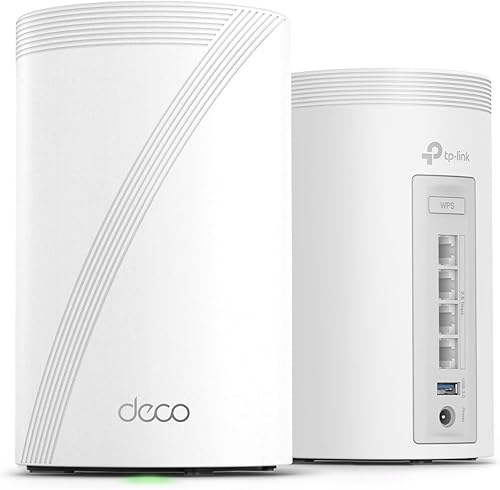
The TP-Link Deco BE68 is a tri-band WiFi 7 mesh system with one 10 Gbps port, one 2.5 Gbps port, and one Gigabit port per unit. The Amazon UK link on this page is for the 3-pack, which TP-Link rates for up to 8,100 sq ft under its test assumptions.
Its strongest case is not a guaranteed speed increase. It is the combination of three-node placement, 6 GHz support, WiFi 7 features such as MLO, and faster wired options than a Gigabit-only mesh.
We have not conducted hands-on testing of the BE68. This review is based on TP-Link UK’s published specifications and feature documentation, checked on July 22, 2026. We do not publish unsupported room-by-room throughput estimates.
Correct UK specifications
TP-Link UK lists the BE68 as BE14000, with advertised wireless link rates of:
- 6 GHz: 8,647 Mbps
- 5 GHz: 4,324 Mbps
- 2.4 GHz: 688 Mbps
Each unit has exactly three Ethernet ports:
- 1× 10 Gbps WAN/LAN
- 1× 2.5 Gbps WAN/LAN
- 1× 1.0 Gbps WAN/LAN
All three are auto-sensing WAN/LAN ports, but only one port serves as WAN at a time. Using 10 Gbps or 2.5 Gbps speeds requires compatible service, cabling, switches, and client equipment.
Backhaul: multi-band wireless, Ethernet, or both
The BE68 does not permanently reserve 6 GHz for node-to-node communication. TP-Link describes wireless and wired combined backhaul and illustrates wireless backhaul across 6 GHz, 5 GHz, and 2.4 GHz alongside Ethernet.
This gives the system more path options, but it does not guarantee a fixed throughput or latency improvement. The result depends on firmware, node placement, walls, interference, Ethernet topology, and the capabilities of each client.
Ethernet backhaul is worth considering when the home already has suitable cabling. It reduces reliance on the wireless link between nodes and can make placement more flexible. It does not turn every client connection into 10 Gbps.
Coverage and the linked 3-pack
TP-Link UK publishes these maximum coverage figures:
- 1-pack: up to 3,100 sq ft
- 2-pack: up to 6,000 sq ft
- 3-pack: up to 8,100 sq ft
The Amazon UK CTA on this page points to ASIN B0G4VV5QY7, a BE68 3-pack. The page therefore uses the 3-pack coverage claim and does not mix it with a 2-pack price or specification.
Coverage figures are planning references, not promises. Brick or stone walls, foil-backed insulation, underfloor heating, neighbouring networks, floor transitions, and poor node placement may reduce the usable area. A smaller property may also need fewer than three units.
What the 10 Gbps port is useful for
The 10 Gbps port can connect to compatible multi-gig broadband, Ethernet backhaul, or fast local-network equipment. Because each unit has only one 10 Gbps port, a wider 10 Gbps local network may require a compatible multi-gig switch.
Do not buy the BE68 solely because “10G” appears on the box. Check the slowest link in the path:
- Internet service speed
- Modem or optical network terminal port
- Ethernet cable and switch capability
- Client Ethernet or WiFi capability
- Storage or server throughput
If the rest of the network is Gigabit, the BE68 still works, but the 10 Gbps port will not create a 10 Gbps end-to-end connection by itself.
Setup and UK ISP considerations
Initial setup uses the Deco app. In a UK home, the simplest arrangement is often to keep the ISP router and run the Deco system in Access Point Mode. Router Mode may be appropriate when the broadband connection, credentials, modem or ONT, phone service, and TV service allow it.
Do not assume one setup applies to every BT, Sky, Virgin Media, or alternative-network connection. Check the ISP’s instructions for the exact service and supplied hardware, particularly when landline, IPTV, VLAN, or authentication settings are involved.
HomeShield and software features
The BE68 includes TP-Link HomeShield, with a free Basic plan and paid options. Features and prices can vary by plan, region, app version, and firmware. Check the current HomeShield matrix before buying specifically for parental controls, network protection, reporting, or remote-management features.
WiFi 7 features also depend on compatible clients. MLO, 320 MHz channels, and 4K-QAM do not provide their full benefit to an older device that lacks those capabilities, and regional spectrum rules can affect channel availability.
Who should consider the Deco BE68 3-pack
- Multi-storey or irregular homes where three carefully placed nodes are useful
- Households adding compatible WiFi 7 or 6 GHz devices
- Networks that need a 10 Gbps uplink, multi-gig backhaul, or a faster local switch
- Buyers who have identified a coverage, capacity, or wired-port limit in the current mesh
Who should skip it
- Homes where the existing WiFi 6 mesh is stable and covers every required room
- Buyers who need more than three Ethernet ports at each node without adding a switch
- Small properties that do not need three nodes
- Anyone expecting the manufacturer’s combined wireless rates at a single phone or laptop
BE68 or BE85?
The Deco BE85 vs BE68 comparison covers the choice in detail. In short, the BE85 provides higher advertised wireless rates and more multi-gigabit ports per unit. The BE68 link on this page provides three smaller units and may be the more practical bundle when placement matters more than maximum wired capacity.
Sources and checking notes
The principal source is TP-Link UK’s Deco BE68 product page. Manufacturer rates, coverage, and device counts are not guaranteed real-home results. Confirm the Amazon UK product title, ASIN, pack size, seller, hardware version, current price, and availability before purchasing.