Why this UK comparison changed
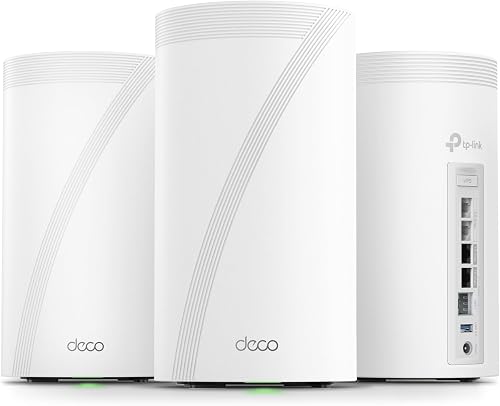
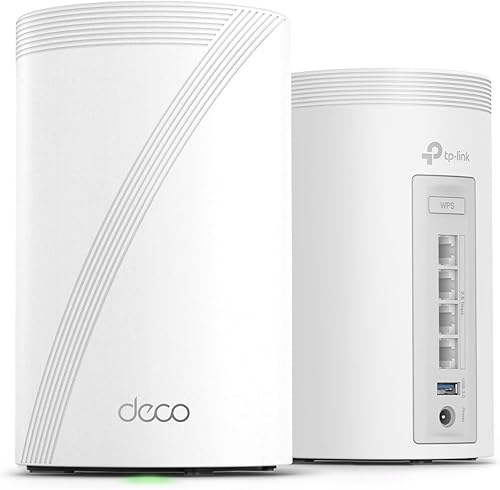
This page previously compared the Deco BE85 with the US-focused Deco BE63 while linking UK readers to a Deco BE68 offer. That mismatch has been removed. The comparison now covers the two products in the linked Amazon UK offers: a Deco BE85 2-pack and a Deco BE68 3-pack.
We have not conducted hands-on testing of either system. Specifications below were checked against TP-Link’s UK product pages on July 22, 2026. Advertised wireless rates and coverage are manufacturer claims, not guaranteed speeds in a particular home.
The short answer
Buy the Deco BE85 when wired capacity is the priority. Each unit provides one 10 Gbps RJ45 port, one 10 Gbps RJ45/SFP+ combo port, and two 2.5 Gbps ports. That is a meaningful advantage when the network includes multi-gig broadband, a fast switch, a NAS, or several wired devices at each node.
Buy the Deco BE68 when the linked 3-pack gives you a more useful layout than two larger BE85 units. It still provides one 10 Gbps port, one 2.5 Gbps port, and one Gigabit port per unit. TP-Link rates the 3-pack for up to 8,100 sq ft, but walls, floors, interference, and node placement can reduce coverage substantially.
Do not choose between them using a claimed universal percentage difference. We found no shared BetterPickAdvisor test dataset that would support statements such as “90% of the performance” or fixed room-by-room throughput numbers.
BE19000 and BE14000 explained
TP-Link’s current UK page identifies the BE85 as BE19000, not BE22000. Its advertised link rates are:
- 11,520 Mbps on 6 GHz
- 5,760 Mbps on 5 GHz
- 1,376 Mbps on 2.4 GHz
The BE68 is BE14000, with advertised rates of:
- 8,647 Mbps on 6 GHz
- 4,324 Mbps on 5 GHz
- 688 Mbps on 2.4 GHz
These totals describe theoretical wireless link rates across bands. They are not the internet speed a phone or laptop will receive. Regional variants and hardware versions can also differ, so the retailer model and TP-Link support label matter more than a specification copied from another market.
Ports are the clearest hardware difference
The BE85 has four multi-gigabit connections per unit: two 10 Gbps options and two 2.5 Gbps ports. One 10 Gbps connection is an RJ45/SFP+ combo, which provides additional flexibility for compatible copper or fibre equipment.
The BE68 has three Ethernet ports per unit: one 10 Gbps, one 2.5 Gbps, and one Gigabit. That is enough for a multi-gig WAN or backhaul plus a limited number of local wired devices, but a larger wired setup may require a separate switch.
This is more decision-useful than comparing unverified wireless speed-test numbers. If every node needs several wired connections, the BE85 has the stronger case. If most clients are wireless and a third node improves placement, the BE68 3-pack may be the more practical bundle.
Backhaul: neither model permanently reserves 6 GHz
Both systems support wireless and Ethernet backhaul. TP-Link describes wireless and wired combined backhaul, and its BE68 documentation shows the wireless path using 6 GHz, 5 GHz, and 2.4 GHz alongside Ethernet.
That means “dedicated 6 GHz backhaul” is not an accurate description. The 6 GHz band can also serve compatible client devices. The system chooses paths according to its capabilities, configuration, firmware, and network conditions.
Ethernet backhaul can reduce dependence on the wireless link between nodes, but it does not guarantee a specific percentage improvement. Cable category, switches, port negotiation, topology, and client limits all affect the result.
The linked bundles are not the same size
The retailer links on this page currently point to:
- Deco BE85: Amazon UK ASIN B0C5Y46J1W, 2-pack
- Deco BE68: Amazon UK ASIN B0G4VV5QY7, 3-pack
This matters. A third, correctly placed node may improve coverage in a tall or irregular home, while two higher-end nodes may suit a smaller property with demanding wired equipment. More nodes are not automatically better: placing units too close together can be unnecessary, and masonry, foil-backed insulation, underfloor heating, and neighbouring networks can change the result.
We do not publish a fixed comparison price because Amazon UK pricing and availability can change. Check the current UK price and confirm the pack size before ordering.
Choose the Deco BE85 if
- You need two 10 Gbps connection options per unit.
- You plan to use SFP+ equipment or multi-gigabit switching.
- Several wired devices will connect near each Deco.
- Two carefully placed nodes are enough for the property.
Choose the Deco BE68 if
- The linked 3-pack suits a multi-storey or awkward layout better.
- One 10 Gbps and one 2.5 Gbps port per unit cover your faster wired needs.
- Smaller units are easier to place around the home.
- You want tri-band WiFi 7 without paying for the BE85’s additional ports.
Keep the existing mesh if
- Coverage and stability are already satisfactory.
- Your clients and wired equipment cannot use the additional bands or multi-gig ports.
- The purchase is based only on theoretical link-rate totals rather than a specific coverage or capacity problem.
Sources and checking notes
The principal sources are TP-Link UK’s Deco BE85 product page and Deco BE68 product page. Retailer ASINs, bundle sizes, prices, availability, hardware versions, firmware features, and regional specifications should be checked again at purchase time.