Choosing the best Wi-Fi router in the UK starts with the home, not the number printed on the box. A one-bedroom flat with a centrally placed hub, a Victorian terrace with masonry walls and a three-storey family home do not need the same network.
This guide is a research-based comparison. BetterPickAdvisor has not lab-tested these five routers. We compared current UK models using independent testing, manufacturer documentation, UK availability and ownership factors such as ISP setup, subscriptions and wired ports. Read How We Research for our editorial process.
Before you buy: these are routers, not broadband modems
All five recommendations have an Ethernet WAN port. None has a built-in ADSL, VDSL or Virgin cable modem.
That distinction matters more in the UK than another step up in theoretical wireless speed:
- Full Fibre with an ONT: a compatible router may connect to the ONT, but the required authentication and VLAN settings depend on the provider.
- FTTC or ADSL over a phone line: these routers cannot accept the DSL cable directly. Keep the ISP modem-router, add a separate modem or buy a DSL modem-router instead.
- Virgin Media cable: keep the Virgin Hub. Supported hubs can run in modem mode, or the new Wi-Fi system can operate behind the hub.
- Digital phone service and ISP pods: replacing the supplied hub can affect voice service, diagnostics or ISP-branded extenders. Confirm this before disconnecting it.
If those terms are unfamiliar, the safest first setup is usually to keep the ISP hub as the broadband gateway and run the new router or mesh as an access point. This avoids most authentication problems, although some advanced routing, security and parental-control features may be unavailable in access-point mode.
Router or mesh? A 30-second decision
Choose a single router when the current hub can sit in a reasonably central, open position and the weak signal is limited. This is usually the less expensive and simpler solution.
Choose a mesh system when the home already has dead zones across floors, behind dense masonry or at opposite ends of a long layout. Several well-placed nodes can carry the network closer to the rooms that need it. A mesh kit is not automatically faster; it is primarily a coverage tool.
If Ethernet runs are available between floors or rooms, use them for wired backhaul. A sensibly placed, wired mesh often delivers a more stable result than buying the most expensive wireless kit and leaving its nodes in poor locations.
Wi-Fi router comparison chart
| Model | Best for | Wireless design | Wired connectivity | Evidence and main catch | Source |
|---|---|---|---|---|---|
| TP-Link Archer BE550 | Best standalone router overall | Tri-band Wi-Fi 7, including 6 GHz | 1× 2.5GbE WAN, 4× 2.5GbE LAN | Strong UK test result and unusually complete multi-gig ports; paid HomeShield features remain | Expert Reviews, TP-Link |
| Asus RT-AX59U | Budget Wi-Fi 6 | Dual-band Wi-Fi 6 | 1× Gigabit WAN, 3× Gigabit LAN | Strong feature set and coverage for the tier; no multi-gig Ethernet or Wi-Fi 7 | Expert Reviews, Asus |
| Asus RT-BE58U | Affordable Wi-Fi 7 | Dual-band Wi-Fi 7, no 6 GHz | 1× 2.5GbE WAN/LAN plus Gigabit ports | Strong multi-device and UK home-test evidence; the Wi-Fi 7 badge does not include every Wi-Fi 7 feature | Expert Reviews, TechGearLab |
| TP-Link Deco BE65 | Larger or multi-storey homes | Tri-band Wi-Fi 7 mesh | 4× 2.5GbE WAN/LAN per unit | Strong evidence for the related BE63/BE65 family; verify the UK hardware version and paid options | TechRadar, TP-Link |
| Asus ROG Rapture GT-AX6000 | Gaming controls | Dual-band Wi-Fi 6 | 2× 2.5GbE plus 4× Gigabit LAN | Useful traffic controls and fast close-range evidence; bulky and not Wi-Fi 7 | Expert Reviews, Asus ROG |
The wireless speed printed on a router is an aggregate theoretical figure, not the speed one phone or laptop will receive. Your broadband plan, client hardware, walls, interference, placement and backhaul can all become the limiting factor.
Check current UK listings
- TP-Link Archer BE550: check price and availability on Amazon UK
- Asus RT-AX59U: check price and availability on Amazon UK
- Asus RT-BE58U: check price and availability on Amazon UK
- TP-Link Deco BE65: check pack size, hardware version and availability on Amazon UK
- Asus ROG Rapture GT-AX6000: check price and availability on Amazon UK
Retail prices, sellers, bundles and hardware revisions can change. Confirm the exact model, number of mesh units, return policy and UK warranty on the retailer page.
How we selected the five routers
We used the following priorities, in order:
- Independent performance evidence. Standardised throughput, range and multi-device tests carried more weight than advertised speed totals.
- Clear use-case fit. Each product needed a specific job. We did not fill the list with five premium Wi-Fi 7 routers that solve the same problem.
- UK buying and setup relevance. UK model names, Ethernet interfaces and ISP-hub constraints were checked separately from U.S. recommendations.
- Ownership costs and control. Subscription features, expansion options, wired ports and software flexibility affect long-term value.
- Current availability. The products have current UK manufacturer or retailer evidence, but a temporary sale price was not used to decide the ranking.
There is no BetterPickAdvisor performance score because we do not have one controlled data set covering all five models. Results from different laboratories are discussed as source-specific evidence, not combined into a made-up percentage.
The five best Wi-Fi routers for UK homes
1. TP-Link Archer BE550 — best standalone router overall
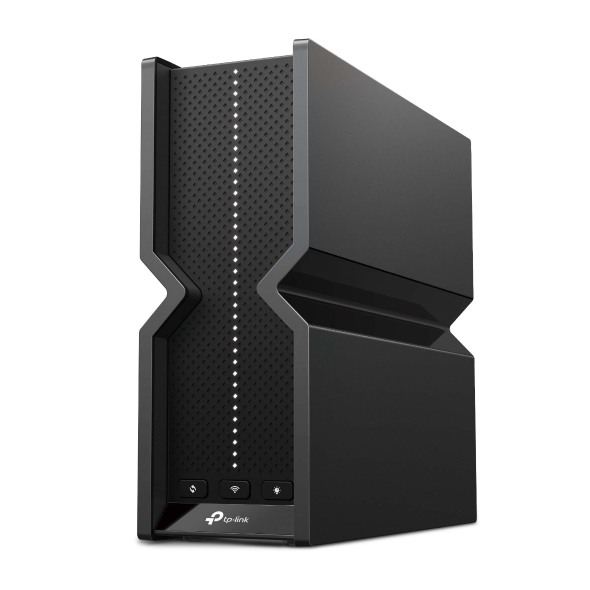
The Archer BE550 is the strongest starting point for a buyer who wants one capable router rather than a multi-node kit. Expert Reviews named it its current overall UK pick, citing its performance, features and value. TP-Link’s UK specification confirms a proper tri-band design with 2.4 GHz, 5 GHz and 6 GHz radios, plus one 2.5GbE WAN and four 2.5GbE LAN ports.
Those wired ports are more useful than a large headline wireless number if the home has a multi-gig internet plan, a NAS, a desktop workstation or wired access points. EasyMesh support also leaves a route to expand later, although buying a purpose-built mesh kit from the outset is cleaner when dead zones are already known.
It is not a universal range winner. TechGearLab’s separate U.S. test found that other models could outperform it at long range and in some multi-device scenarios. That is a useful counterweight to the UK overall award: choose the Archer for its balanced package, not because one router is guaranteed to cover every property.
TP-Link includes basic HomeShield tools, but some advanced security and parental-control functions require payment. Compare the free feature set with Asus before assuming the higher hardware specification also includes every service.
Choose it if: you want one tri-band Wi-Fi 7 router, have or expect multi-gig wired devices, and can place it centrally.
Skip it if: the home already has several hard dead zones, or subscription-free controls matter more than 6 GHz and multiple 2.5GbE ports.
Check price & availability on Amazon UK
2. Asus RT-AX59U — best budget Wi-Fi 6 router
The RT-AX59U is the sensible choice when Wi-Fi 6 is enough and the budget should pay for useful software rather than the newest badge. In Expert Reviews’ domestic test, it delivered solid coverage and averaged 49 MB/s across the publication’s locations. That number belongs to its test home and equipment, but it supports the model’s position as more than a specification-only budget pick.
Asus confirms three Gigabit LAN ports, a Gigabit WAN port, two USB ports and AiMesh support. The USB options can support shared storage, printing or a compatible mobile-internet backup. More importantly for families and home offices, Asus advertises AiProtection Pro, parental controls and Safe Browsing without an ongoing subscription.
The limitations are deliberate. There is no Wi-Fi 7, 6 GHz or multi-gig Ethernet. A full-gigabit broadband connection can also lose some real-world throughput to protocol overhead before wireless conditions are considered. If the home has a 2 Gbps service, a fast NAS or new Wi-Fi 7 clients, the Archer BE550 or RT-BE58U has a better upgrade path.
Choose it if: the current problem is weak or inflexible Wi-Fi, the internet plan is 1 Gbps or below, and strong free controls matter.
Skip it if: multi-gig wired networking or Wi-Fi 7 is part of the reason for upgrading.
Check price & availability on Amazon UK
3. Asus RT-BE58U — best affordable Wi-Fi 7 router
The RT-BE58U is a more nuanced Wi-Fi 7 recommendation. It supports Wi-Fi 7 features such as Multi-Link Operation, but it is a dual-band model using 2.4 GHz and 5 GHz. It does not have a 6 GHz radio or 320 MHz channels. That makes it less capable on paper than the Archer BE550, but potentially better value for a home whose devices mostly use 5 GHz anyway.
The independent evidence is credible from two different setups. Expert Reviews measured more than 500 Mbit/s in most of its locations and no result below 250 Mbit/s in that test home. TechGearLab also rated its multi-device behaviour strongly, while identifying range tradeoffs of its own. These are not guarantees for a UK property, but they show why the router earns a place without relying on its BE3600 label.
One 2.5GbE WAN/LAN port helps with a faster internet service or wired backhaul, while Asus firmware adds VPN, separate IoT-network options, AiMesh and subscription-free security. Management depth can also be a drawback: buyers who want only a two-minute setup may find the interface busier than a simpler mesh app.
Choose it if: you want current Wi-Fi 7 behaviour and Asus controls at a lower tier, but do not need a 6 GHz radio.
Skip it if: the new laptop or phone was purchased specifically to use 6 GHz, or a large home needs several mesh nodes immediately.
Check price & availability on Amazon UK
4. TP-Link Deco BE65 — best mesh for larger or multi-storey homes
The Deco BE65 is the only multi-node system in this ranking because mesh solves a different problem from the four standalone routers. Place its units across a long or multi-floor home, and the network can reach rooms that are poorly served by one device near the broadband entry point.
Regional naming needs to be explicit. TechRadar tested the Deco BE63 and says the related system is sold as the BE65 in the UK and Australia. The publication reported strong Wi-Fi 7 performance and easy setup, but also warned that regional variations affect performance and features. TP-Link’s UK BE65 page confirms tri-band Wi-Fi 7, four 2.5GbE ports per unit and support for wired or wireless backhaul.
Do not treat a three-pack as automatically better than a two-pack. Too many tightly spaced nodes can increase interference, while a distant node with a poor wireless link cannot create bandwidth that never reaches it. Start from the floor plan, put nodes between the main unit and dead zone, and use Ethernet backhaul where possible.
Check the exact pack size and hardware version before buying. Also compare the included HomeShield features with the paid tier; the full security and parental-control package is not entirely free.
Choose it if: dead zones, several floors or a long layout make coverage the primary problem.
Skip it if: one central router already reaches every room, or the budget would be better spent adding Ethernet between floors.
Check price & availability on Amazon UK
5. Asus ROG Rapture GT-AX6000 — best for gaming controls
The GT-AX6000 is the least fashionable specification here and the most specialised recommendation. It is a dual-band Wi-Fi 6 router, not Wi-Fi 7, but it provides traffic prioritisation, a dedicated gaming port, game-oriented QoS controls, two 2.5GbE interfaces and four Gigabit LAN ports.
Expert Reviews selected it as its gaming pick and measured fast close-range performance, while noting that speeds fell with distance. Asus also provides AiMesh, VPN controls and network security without requiring the buyer to move to a separate paid security service.
Gaming features only help with congestion the router can control. They cannot repair packet loss on the broadband line, change the distance to a game server or make a remote ISP route shorter. Connect the console or PC by Ethernet and test the line under household load before paying for gaming-specific software.
The physical design is large and conspicuous. For a quiet home network with no competing traffic, the RT-AX59U is easier to justify. For a busy house where one person games while others upload, stream and call, the extra controls are more relevant.
Choose it if: you want detailed traffic controls, dual 2.5GbE connectivity and wired gaming within an Asus network.
Skip it if: the main issue is whole-home coverage, or the household does not need specialised QoS controls.
Check price & availability on Amazon UK
BT, Sky and Virgin Media compatibility
BT and other Openreach services
First identify whether the service is Full Fibre with an ONT or DSL from a phone socket. An Ethernet router can connect to an ONT only when it supports the provider’s required WAN settings. It cannot replace the modem in a DSL connection.
The low-risk route is to keep the BT hub and use the new system as an access point. Direct replacement can be appropriate for an experienced user, but confirm PPPoE, VLAN, Digital Voice and support requirements for the exact service first. Keep the supplied hub so it can be reconnected during ISP fault diagnosis.
Sky Broadband
TP-Link’s current Sky Broadband UK setup guide recommends connecting a normal router or Deco system behind the Sky hub for the simplest FTTP or FTTC setup. It also notes that Sky hubs do not provide ordinary bridge mode. Access-point mode avoids double NAT, but can disable some advanced features on the new router.
Directly replacing a Sky hub is connection-specific and may involve MER, VLAN or DHCP authentication. Do not assume that the phrase “works with all ISPs” means every Sky line can be connected without additional settings.
Virgin Media
Virgin Media documents modem mode for Hub 3, 4 and 5. In that setup, the Virgin Hub remains the cable modem and the new router handles routing and Wi-Fi. Virgin currently says modem mode is not available on Hub 5x.
Modem mode also disables some Virgin features, including parts of its Wi-Fi management and Pod ecosystem. If those matter, keep the hub in router mode and use the new system as an access point instead.
Wi-Fi 6, Wi-Fi 6E or Wi-Fi 7?
Wi-Fi 6 remains enough for many homes. It supports efficient multi-device use, modern security and wide client compatibility. A strong Wi-Fi 6 router in the correct position can beat a Wi-Fi 7 router placed inside a cupboard at one end of the house.
Wi-Fi 6E adds 6 GHz. That band can provide clean, high-capacity channels for compatible devices, but it generally has less reach through walls than lower frequencies.
Wi-Fi 7 can add Multi-Link Operation, wider channels and denser modulation. The exact feature set varies. The dual-band RT-BE58U is genuinely Wi-Fi 7 but lacks 6 GHz; the tri-band Archer BE550 and Deco BE65 include it. Check both the router and client device rather than buying on the standard name alone.
If a stable Wi-Fi 6 network already delivers the full internet speed where it is needed, upgrading only to change the badge is unlikely to transform normal browsing or streaming.
What works for thick walls and difficult layouts
Dense brick, stone, foil-backed insulation, mirrors, metal appliances and water can all weaken Wi-Fi. More transmit power is not a complete answer because the phone or laptop must also transmit back to the router.
Use this order of operations:
- Move the current router into the open, higher than floor level and as close to the centre of the home as the incoming cable permits.
- Test the weak room on both 2.4 GHz and 5 GHz. The slower 2.4 GHz band can sometimes remain usable through more obstacles.
- Run Ethernet to the room or floor when practical. A wired access point is the most predictable fix.
- If wiring is not practical, place a mesh node before the dead zone, not inside the place where the signal is already unusable.
- Buy the number of nodes the layout requires, not the largest pack by default.
No responsible guide can guarantee coverage from a model name or square-foot claim alone.
Security, parental controls and subscriptions
| Model family | Useful included tools | Potential ongoing cost |
|---|---|---|
| TP-Link Archer / Deco | Basic HomeShield security and controls | Some advanced HomeShield security and parental controls |
| Asus RT / ROG | AiProtection, parental controls, VPN and AiMesh features advertised without a security subscription | Optional third-party VPN or filtering services only if you choose them |
Free features and plan names can change through firmware and app updates. Review the current manufacturer comparison before buying if a specific category filter, time limit, device profile or threat-protection feature is essential.
When not to buy a new router
Do not upgrade until these checks are complete:
- A wired speed test at the ISP hub confirms the broadband line is delivering close to the expected service.
- A test beside the current hub separates a Wi-Fi coverage problem from an ISP problem.
- The current router has been updated and rebooted, and its placement has been improved.
- The weak client is not limited by an old Wi-Fi adapter.
- One dead room would not be solved more cheaply and reliably by Ethernet or a single access point.
- The current network is stable; a new standard alone is not a reason to replace working equipment.
This diagnostic value is part of the page’s recommendation. The correct purchase for some readers is no purchase.
Final buying checklist
Before opening a retailer listing, write down:
- the ISP and whether the incoming connection is ONT, cable or DSL;
- whether Digital Voice, ISP TV boxes or provider Wi-Fi pods depend on the supplied hub;
- the number and location of current dead zones;
- the fastest internet plan expected during the router’s useful life;
- the devices that actually support Wi-Fi 6E or Wi-Fi 7;
- the number and speed of required Ethernet ports;
- whether mesh nodes can use wired backhaul;
- which security or parental-control features must remain free;
- the seller, UK warranty, hardware version, pack size and return period.
The Archer BE550 is the best balanced standalone choice in this comparison, but the decision should change when the home calls for mesh, a lower budget or specialised traffic control. Solve the network shape first; the product ranking comes second.
Research sources
We reviewed independent UK and U.S. testing because the methods reveal different strengths and weaknesses. Key sources include Expert Reviews UK, Which?, TechRadar, RTINGS, Tom’s Guide, Tom’s Hardware and TechGearLab.
Manufacturer sources were used for specifications and supported features, not as independent performance evidence. Last fact-check: July 22, 2026.