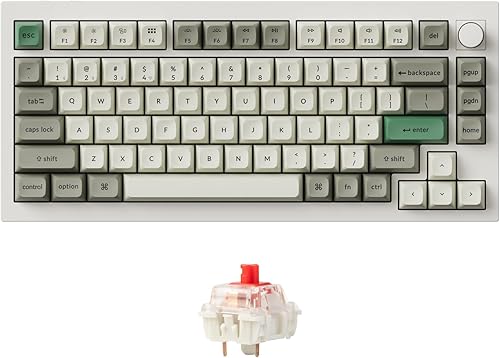
The best mechanical keyboard for programming is the one whose layout matches your shortcuts, pointing-device habits, desk, and willingness to learn layers. A premium case cannot compensate for a missing key you use hundreds of times a day.
This guide is research-based. BetterPickAdvisor did not conduct a standardized typing-speed, fatigue, sound, latency, or durability test on these five boards. We verified current configurations against manufacturer documentation and selected different layout strategies rather than assigning unsupported decimal ratings.
Quick decision
| Your working style | Start with | Why | Main compromise |
|---|---|---|---|
| One premium board for a fixed desk | Keychron Q1 Max | Familiar 75% layout, QMK/VIA, hot-swap, three connection modes | Very heavy |
| Quiet compact keyboard and minimal mouse travel | HHKB Hybrid Type-S | Silent Topre switches and compact HHKB layout | Nonstandard arrows and navigation |
| You actively want split ergonomics and layers | ZSA Voyager | Split columnar geometry and mature remapping tools | Wired setup and steep learning curve |
| Programmability on a lower budget | Keychron V1 Max | Core QMK/VIA and wireless features without an aluminum case | Less premium case construction |
| Laptop bag and low-profile typing | NuPhy Air75 V3 | Thin 75% format and multi-mode connectivity | Smaller switch ecosystem |
Evidence snapshot
| Model | Official source | Verified decision facts |
|---|---|---|
| Keychron Q1 Max | Keychron specifications | 75%, aluminum body, QMK/VIA, hot-swap, three connection modes, about 1,724 g assembled |
| HHKB Hybrid Type-S | HHKB product page | 60 keys, silent Topre, USB-C, four-device Bluetooth pairing, onboard keymaps |
| ZSA Voyager | ZSA Voyager overview | 52 keys, split columnar layout, hot-swap Choc switches, QMK, Oryx, up to 32 layers |
| Keychron V1 Max | Keychron product page | 75%, plastic housing, QMK/VIA, hot-swap, wired/Bluetooth/2.4 GHz |
| NuPhy Air75 V3 | NuPhy product page | Low-profile 75%, hot-swap, Mac/Windows support, wired/Bluetooth/2.4 GHz |
Official specifications establish what the keyboard includes. They do not prove that a switch feels better, that a layout will reduce discomfort, or that a wireless connection will behave identically in every RF environment.
Choose the layout before the switch
75%: the lowest-risk compact choice
A 75% board keeps the function row and arrow cluster while removing most empty space and the number pad. It works well for IDE shortcuts, debugging keys, terminal navigation, and general writing without forcing every command behind a layer.
The Keychron Q1 Max and V1 Max share this broad layout strategy. The Q1 Max spends more on case material, mass, and construction; the V1 Max keeps the programmable core in a lighter plastic chassis.
60% and HHKB: efficient only after adaptation
The HHKB layout moves Control and removes a dedicated arrow cluster. Users who embrace its shortcuts can keep their hands close to home row. Users who frequently switch between shared keyboards may find the muscle-memory cost frustrating.
Do not buy a 60% board because it looks clean. Print the layout, identify every shortcut you use, and confirm how arrows, function keys, Delete, Home, End, and media commands work.
Split columnar: a workflow change, not a cosmetic upgrade
The Voyager separates the halves and aligns keys in columns. Its 52-key count makes layers essential. This can reduce lateral reach and let you position each half around your shoulders, but it also changes how you type, use shortcuts, and travel.
ZSA offers a life-size printable layout and browser-based configuration tools. Use them before ordering. A split keyboard is a poor impulse purchase if you cannot commit time to gradual retraining.
Switches: choose force, travel, and sound together
“Red,” “Brown,” and “Blue” are families of behavior, not universal feel standards across every manufacturer.
| Switch approach | What you feel | What to check |
|---|---|---|
| Linear | Smooth travel without a tactile bump | Spring weight, bottom-out force, noise at full travel |
| Tactile | A bump around actuation | Bump strength, pre-travel, return feel, shared-office sound |
| Clicky | Tactile event plus a click mechanism | Whether coworkers or calls make the noise unacceptable |
| Topre | Electrostatic-capacitive mechanism over a dome | Unique feel, replacement ecosystem, premium cost |
| Low-profile Choc or Nano | Shorter overall stack and travel | Smaller keycap/switch ecosystem and different tactile behavior |
Hot-swap sockets let you change compatible switches without soldering, but compatibility still matters. MX-style and low-profile Choc sockets are not interchangeable.
Programmability: QMK/VIA versus proprietary tools
QMK-based keyboards can store complex layouts and layers on the board. VIA offers a friendlier interface for supported boards. ZSA uses QMK underneath while providing Oryx and Keymapp for configuration and live layer guidance.
Before buying, check:
- Whether remaps are stored on the keyboard.
- Whether the configurator supports your operating system and browser.
- Whether wireless mode keeps the same keymap behavior.
- Whether corporate device policies allow configuration software.
- Whether you need macros that your workplace security policy prohibits.
Connectivity and shared-device work
Bluetooth is useful for switching among laptops and tablets, while 2.4 GHz usually targets a lower-latency dedicated connection. Wired USB-C is the simplest fallback and may be required for firmware or keymap updates.
Do not choose by connection count alone. Check how device switching works, where the receiver is stored, whether the cable carries data, and whether your KVM or dock recognizes the board during boot.
Ergonomics without overpromising
A mechanical switch does not automatically reduce fatigue or prevent repetitive-strain injury. Desk height, chair support, keyboard distance, mouse position, wrist angle, typing force, breaks, and workload all contribute.
If the keyboard cannot reach a neutral seated or standing height, fix the workstation before buying a more expensive board. Our standing desk guide explains how to measure keyboard height, desktop depth, and real equipment load.
OSHA’s computer keyboard guidance recommends keeping shoulders relaxed, elbows close, and wrists aligned with the forearms. If you have persistent pain, numbness, or weakness, change the workload and seek qualified medical advice rather than expecting a keyboard purchase to solve it.
Research notes
Product specifications were checked on August 19, 2026. The previous version incorrectly called this a Top 10 while listing five products, reused a Keychron image for the ZSA Voyager, and displayed unexplained decimal ratings. Those elements were removed. Product availability and configurations can change, so verify the exact layout, switch option, and return policy before ordering.