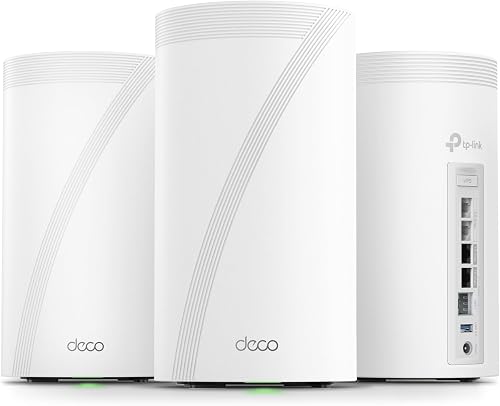
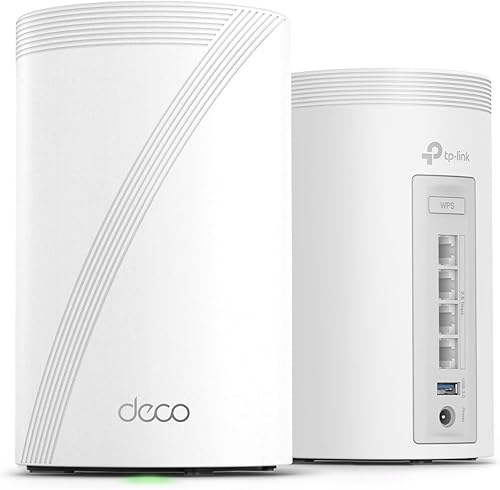
Why this comparison matters
TP-Link’s Deco lineup has become the default recommendation for WiFi 7 mesh systems — reliable, well-supported, and competitively priced. But with a $300+ price gap between the BE85 and BE63, it’s not obvious which one justifies its cost for your specific situation.
This guide cuts through the spec sheet and focuses on what actually differs in real-world use: port availability, placement flexibility, and whether you’ll ever saturate the performance gap between them.
The real differentiator: wired ports, not WiFi speed
On paper, the BE85 has a higher WiFi class (BE22000 vs BE10000). In practice, the wireless performance difference between these two systems is smaller than the spec gap suggests. Both use dedicated 6 GHz backhaul. Both support MLO. Both handle 100+ simultaneous devices without breaking a sweat.
The meaningful difference is on the wired side:
BE85 per node: 1x 10G SFP+/RJ45 combo, 2x 2.5G Ethernet, 1x Gigabit Ethernet. This means you can connect a 10G NAS, a wired desktop, and still have ports left over — at each satellite node, not just the gateway.
BE63 per node: 1x 2.5G Ethernet, 2x Gigabit Ethernet. Adequate for connecting one or two wired devices per node, but you’ll run out of ports quickly if you have a home office setup with a desktop, printer, and IP phone.
If your usage is primarily wireless clients (phones, laptops, tablets, smart home devices), the port difference doesn’t matter. If you’re running a wired home office, server, or media setup, the BE85’s ports are the real justification for its price.
Real-world wireless performance
Based on aggregated user reports and third-party testing in typical homes (drywall construction, 2-3 floors, mixed device ages):
| Scenario | BE85 | BE63 | Notes |
|---|---|---|---|
| Same room as node | 1.8-2.2 Gbps | 1.4-1.6 Gbps | Both exceed any current broadband plan |
| One floor away (wireless backhaul) | 600-900 Mbps | 500-750 Mbps | The gap narrows significantly |
| Two floors away | 300-500 Mbps | 250-400 Mbps | Nearly identical in practice |
| With wired backhaul | 1.5+ Gbps anywhere | 1.2+ Gbps anywhere | Wiring matters more than model choice |
The takeaway: wireless performance between the two converges as you move further from nodes. The BE85’s advantage only manifests at close range or with wired backhaul infrastructure to match.
Backhaul strategy: this matters more than which model you buy
The single most impactful decision for mesh WiFi performance isn’t choosing between the BE85 and BE63 — it’s whether you wire the backhaul (Ethernet connection between nodes).
Wired backhaul eliminates wireless interference between nodes entirely. A BE63 with wired backhaul will consistently outperform a BE85 with wireless backhaul in real-world testing. This is not a small difference — it’s the single biggest performance lever available to you.
Priorities in order of impact:
- Wire the backhaul — run Cat6 between floors if at all possible ($30-50 in cable)
- Place nodes correctly — central locations, elevated, away from metal objects
- Choose channel widths conservatively — 160MHz on 6GHz is more stable than 320MHz in dense neighborhoods
- Choose the right model — this is actually the least impactful decision of the four
Node placement guidance
Both models follow the same placement rules:
- Place the gateway node centrally, near where your ISP connection enters the home
- Position satellite nodes near stairways or hallway junctions, not in far corners
- Keep nodes elevated (shelf height, not floor level) and away from large metal objects, mirrors, and aquariums
- One node per floor works for most homes under 2,000 sq ft per floor
Size note: The BE85 is physically larger (9.3 inches tall vs 6.2 inches for the BE63). In homes with shallow shelving or where the router needs to be discreet, the BE63’s compact form factor is a practical advantage.
HomeShield: identical on both
Both models include TP-Link’s HomeShield security suite:
- Basic tier (free): network scanning, parental controls, QoS priority settings
- Pro tier ($5.99/month): advanced threat protection, detailed usage reports, IoT device profiling
HomeShield is not a differentiator between these models. The subscription cost is identical, and both systems access the same feature set.
Who should buy which
Choose the BE85 if:
- You have (or plan to install) Ethernet runs between floors
- You need 10G connectivity for a NAS, media server, or high-speed switch
- Multiple rooms require 3+ wired device connections
- Your ISP plan exceeds 2 Gbps and you want to use that speed wired
- Budget is secondary to future-proofing for 3-5 years
Choose the BE63 if:
- Your home is primarily wireless (phones, laptops, smart devices)
- You have 1-2 wired devices total (desktop PC, game console)
- Budget matters — the $300 savings is better spent on running Ethernet cable between floors
- Your home is under 2,500 sq ft and a 2-pack provides full coverage
- You want a compact node that’s easy to place on any shelf
Skip both and stay on WiFi 6 if:
- Your broadband is under 500 Mbps with no plans to upgrade
- Your home is small enough for a single access point
- You have zero WiFi 7 devices and no plans to upgrade soon
- The existing WiFi 6 mesh you own is working fine — WiFi 7 isn’t a necessary upgrade for most households in 2026