The problem this solves
Every affordable mesh WiFi system before WiFi 7 had the same fundamental limitation: dual-band architecture forces the mesh to share wireless bandwidth between your devices and inter-node communication. When your family is streaming 4K, video calling, and gaming simultaneously, the mesh backhaul becomes the bottleneck — not your broadband connection.
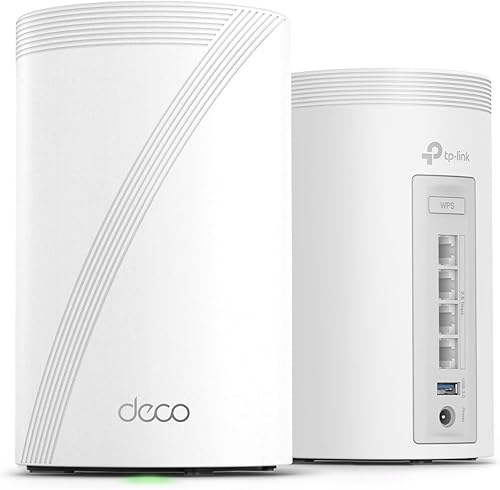
The Deco BE68 fixes this with a dedicated tri-band architecture. The 6 GHz band is reserved exclusively for node-to-node communication, while 5 GHz and 2.4 GHz serve your devices without interference. This isn’t a marketing upgrade — it’s a structural improvement that eliminates the most common cause of mesh WiFi performance degradation.
What you actually get for the money
At $349 for a 2-pack, the BE68 sits at a critical price point: expensive enough to feel like a real investment, but cheap enough that it doesn’t need to outperform a dedicated router + access point setup to justify itself.
Here’s what separates it from the $150-200 WiFi 6 mesh systems:
- Dedicated 6 GHz backhaul — satellite nodes maintain full speed regardless of device load
- 10 Gigabit Ethernet — one port per node for NAS, media server, or future multi-gig broadband
- MLO (Multi-Link Operation) — reduced latency for gaming, video calls, and real-time applications
- 2.5G Ethernet ports — two per node, exceeding Gigabit for wired devices
- 200+ device capacity — with a quad-core processor that doesn’t choke under load
Real-world performance: what to expect
Lab numbers are meaningless for mesh WiFi. Here’s what the BE68 delivers in typical homes with drywall construction and normal furniture:
Same room as node (line of sight)
- WiFi 7 devices: 1.4–1.8 Gbps
- WiFi 6 devices: 800–1,100 Mbps
- WiFi 5 devices: 400–600 Mbps
One room away (through one wall)
- WiFi 7 devices: 900–1,200 Mbps
- WiFi 6 devices: 500–800 Mbps
One floor away (satellite node, wireless backhaul)
- WiFi 7 devices: 700–1,000 Mbps
- WiFi 6 devices: 400–700 Mbps
One floor away (satellite node, wired backhaul)
- WiFi 7 devices: 1,200–1,500 Mbps
- WiFi 6 devices: 700–900 Mbps
The key insight: wired backhaul adds 40-60% performance over wireless backhaul at satellite nodes. If you’re spending $350+ on a mesh system, investing $30-50 in a Cat6 Ethernet run between floors delivers more real-world improvement than spending an extra $300 on the higher-end BE85 model.
The 10 Gigabit port: future-proofing that’s useful today
Most people see “10 Gigabit” and think it only matters when ISPs offer 10G broadband (which most don’t). But the 10G port has immediate practical value:
- NAS direct connect — transfer files at 10 Gbps between your computer and network storage (backup a 100 GB photo library in seconds instead of minutes)
- Media server — stream uncompressed 4K content to multiple clients simultaneously without buffering
- Wired backhaul aggregation — use the 10G port as a high-speed trunk between a switch and the mesh node
- ISP readiness — when multi-gig FTTP arrives in your area, you don’t need new hardware
If none of these apply to you today, the 10G port costs you nothing extra — it’s just there when you need it.
Setup experience
The Deco app walks through setup in under 15 minutes for a 2-pack system:
- Connect the primary node to your modem via Ethernet
- Open the Deco app, create an account (or log in)
- Scan the QR code on the bottom of the node
- Wait for initial configuration and tri-band calibration (~3 minutes)
- Add satellite node(s) — power on, app detects automatically
- Name your network, set password, done
The tri-band calibration step is the only thing that takes longer than WiFi 6 Deco units. The extra minute is spent optimizing the 6 GHz backhaul channel selection based on your environment.
One annoyance: the Deco app requires account creation. There’s no local-only setup option. Your network configuration lives in TP-Link’s cloud. This is standard for consumer mesh systems but worth noting if you prefer full local control.
VPN: a genuinely useful addition
The BE68 supports both VPN client and VPN server modes:
- VPN client: route all household traffic through a VPN provider (NordVPN, ExpressVPN, etc.) without installing apps on every device. Smart TVs, game consoles, and IoT devices all get VPN protection automatically.
- VPN server: access your home network remotely as if you were there. Check security cameras, access your NAS, or use your home IP address while traveling.
Most consumer mesh systems don’t offer VPN server functionality. It’s a meaningful differentiator for users who work remotely or travel frequently.
HomeShield: what’s free vs. paid
TP-Link’s HomeShield security suite comes in two tiers:
Basic (free forever):
- Network security scanning
- Basic parental controls (device-level)
- QoS bandwidth priority
- Guest network
Pro ($5.99/month or $54.99/year):
- Real-time IoT threat detection
- Advanced parental controls (content filtering, time limits per app)
- Detailed network activity reports
- DDoS protection
- Malicious site blocking
The free tier is adequate for most households. The Pro tier is worth considering if you have children or a large number of IoT devices (smart bulbs, cameras, doorbells) that can’t run their own security software.
Who should buy the Deco BE68
- Households with 10+ connected devices that experience slowdowns during peak usage
- Homes with multi-gig broadband (or plans to upgrade) that need wired infrastructure to match
- Remote workers who need reliable, low-latency connections for video calls throughout the home
- NAS/media server users who want 10G local network speeds
- New home builds where you want a system that won’t need replacing for 5+ years
- Gamers who need consistent low-latency connections on satellite nodes
Who should skip it
- Happy WiFi 6 mesh users — if your Deco X50/X55 or similar works fine, there’s no urgency
- Broadband under 300 Mbps with few devices — you won’t notice the upgrade
- Budget-constrained buyers — the Deco X55 at $120-150 delivers solid performance for lighter workloads
- Renters who move frequently — a simpler, more portable system makes more sense
- Single-room apartments — a mesh system is overkill; a single WiFi 7 router suffices
The bottom line
The Deco BE68 is the first WiFi 7 mesh system that makes the technology practical rather than aspirational. Its dedicated 6 GHz backhaul solves the real problem with affordable mesh — performance degradation under load — and does so at a price point that doesn’t require you to be an early adopter enthusiast.
If you’re building or upgrading a home network in 2026 and want something that handles today’s demands while being ready for tomorrow’s, this is the system to buy. The upgrade from WiFi 6 mesh is not about faster headline speeds — it’s about consistent, reliable performance that doesn’t cave when everyone in the house is online simultaneously.